Grouping the Data
The Group By options can be used to show how a single element, such as a UDC, contributes to the overall size of the VHS. Points that do not meet the group criteria are rolled up and included in the **Sum of minor points row. This line provides the comparison of how the grouped items compare to the rest of the items in the VHS.
|
Group By |
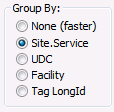
If an option other than None is chosen, the data will be shown in a tree control with the totals rolled up. The number or points included in the grouping appears in parentheses after the group name. Groups can be expanded to see the individual points with the same information as the standard grid. Only one grouping criteria may be selected at a time.
| Group Type | Description |
|---|---|
|
None |
No grouping is used. All points appear on their own row. |
|
Site.Service |
Groups points by current value service. |
|
UDC |
Groups points by Uniform Data Code. This option applies only to current PNT points. |
|
Facility |
Groups points of the same facility together. This option applies only to current PNT points. |
|
Tag LongID |
Groups points by their Long ID. Since each Long ID is unique a group control will be produced for each Long ID with only its single point beneath it. This option is useful for grouping points that no longer exist in the PNT. To group points that no longer reside in the PNT use the point’s Site.Service with wildcards. |
Click Refresh to refresh statistics after changing a group filter.

